How to Become a Web Developer
Web development is an industry that won’t die out anytime soon.
In fact, the US Bureau of Labor Statistics has predicted a 27% growth in available web development jobs through 2024.
It was also rated as the #2 hottest job in 2016.
Put simply, if you can develop this skill, you won’t have a hard time finding work for the foreseeable future.
Here are FIVE big advantages/benefits of being a web developer:
- You can work remotely. Ever wondered what it would be like to work from anywhere in the world, on your own time? Well as a web developer, you’ll have plenty of opportunities to work remotely. Maybe you can finally fulfil that dream of traveling the world, all while saving money at the same time.
- You can use your skills to build your own websites and web applications. Want to build your own profitable website or application? With this skill, you won’t have to pay a ton of money to get it built. You can build it yourself for a fraction of the price.
- You can work independently. You no longer have to work under the umbrella of a boss if you don’t want to. You can freelance or start your own business much easier when you know web development.
- Get into the profitable tech industry. Web development is basically your ticket into the tech industry. Most tech startups have some need for web developers, so this can be your way to get your foot in the door.
- You can build awesome stuff! The fun part is that you can be as creative as you want. Instead of looking at websites and thinking, “Wow, that looks awesome. I wish I could create something like that,” you will now be able to create your very own awesome-looking website.
So, what do you think? Does all of this get you excited about the idea of becoming a web developer? If so, you’re in the right place – because you’re about the learn the steps you need to take to become one!
How to Become a Web Developer
1. Learn the Basics of HTML, CSS, and Javascript
These are the nuts and bolts of all website development that you’ll work with daily if you decide to build websites for a living.
- HTML dictates the structure
- CSS will make it look pretty
- Javascript will make it function
Let’s discuss each one of these and how you can learn them.
HTML
 HTML stands for Hypertext MarkUp Language. It’s one of the main ingredients of any website and one of the so-called frontend languages.
In short, it provides the basic skeleton of a website, and it does so mainly through a series of tags.
A tag is the HTML code that control the appearance of the HTML document’s content.
Here are some common HTML tags you should get familiar with:
- <HTML>…</HTML> – This tag shows up at the beginning and end of an HTML document. It indicates that the document is written in HTML5.
- <title>…</title> – The title tag is the title for the page. This is useful both for search engines (when they scan and index pages) and users (it shows up in a browser’s title bar) by explicitly stating the primary topic of each page
- <head>…</head> – This contains information about the specific page, including title tags, meta data, and links to scripts and style sheets.
- <body>…</body> – This includes all content that will be shown to users, including everything they’ll see and read.
Note: All tags start like “<body>” and end like “</body>”. The “/” indicates that the specific tag is so longer in use afterwards. It’s important to put the end tag in, or the entire document will use that tag.
Here are some resources for learning HTML:
 CSS
CSS
CSS stands for Cascading Style Sheets.
It puts the style behind the HTML structure. Basically without CSS, html would be boring and the as a result the web page would be boring.
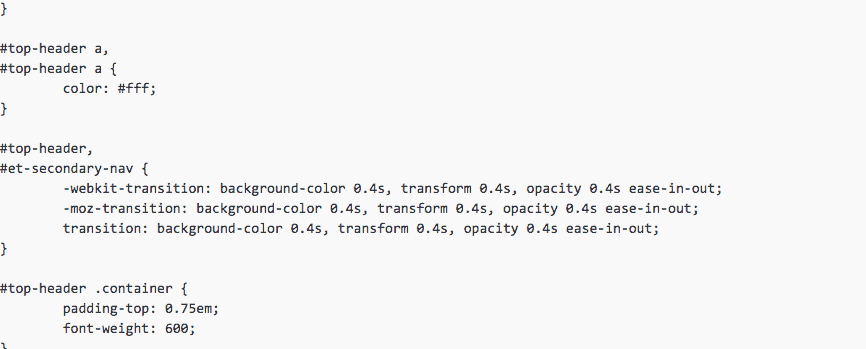
Here’s how they combine: Within your HTML code, you reference a CSS style sheet.
Here’s an example of what CSS looks like in action:
Here’s a great resource for learning CSS: CSS Cheat Sheet
Javascript
Javascript is a programming language that allows you to implement elements on web pages. It powers things like interactive maps, 2D/3D graphics, and more.
Here’s a great resource to help you learn Javascript:’
2. Go Through WordPress Tutorials
 To become a web developer, you’ll have to get familiar with WordPress. After all, 25% of all websites are powered by this free open-source software which you can install to basically any web host.
Once you set up a WordPress site, it’s fairly easily for your clients to add content by themselves (even if they don’t have any web development experience).
I have plenty of WordPress guides on this website. Check out the links below:
3. Learn the Basics of UI and UX
UI (User Interface) and UX (User Experience) are the basics of user experience design.
Most developers aren’t design experts – these are two different realms. So, you don’t need to be a design rockstar.
However, by learning the fundamentals of user experience design, you can better understand how a website is supposed to work in order to keep more users on the site, help them find what they’re looking for, and ultimately spend more money on that site.
To learn the building blocks of design skills, I recommend learning the Adobe Creative Suite. Photoshop should be the first thing you dive into, as it’s the go-to for most serious designers. If you don’t like Adobe, you can also dive into Sketch, which is a rising star among designers.
Here are some resources for understanding and learning UI and UX:
- The Difference Between UX and UI Design-A Layman’s Guide
- Treehouse and Lynda offer excellent beginner courses in both Photoshop and general design concepts
- Here’s a collection of useful web development resources including fonts, typography and logos.
4. Learn SQL and PHP (More Advanced)
I’ll lump these two together because they’re like two sides of the same coin.
SQL is a database technology that stores information. And PHP is a ‘scripting’ language that places or pulls stuff from a database.
Think about WordPress for example.
It uses MySQL to store and manage information (like blog posts, page content, comments, user information, etc.) in a database ‘table’. PHP is what makes a WordPress website dynamic, interacting with all of these different elements and properly updating the database as you go.
Learning more about how SQL and PHP work together can help you master WordPress site development, which literally hundreds (if not thousands) of people are looking for every day on job and project boards across the internet.
Additional resources for learning PHP and SQL:
It’s not easy. You won’t master all of these over a week or two. But over time, becoming familiar and then good at these skill sets will mean you always have a profitable career ahead of you.
5. Learn the Basics of SEO
SEO stands for Search Engine Optimisation. This refers to the process of improving a website’s rankings within a search engine like Google. It’s one of the most important skills in online business.
But you may be thinking, “If I’m a developer, why do I need to worry about how well a site ranks in the search engines? Isn’t that the job of the bloggers and content creators?”
Well yes, a large part of a website’s SEO has to do with the content. But the actual structure and code of the website plays a role as well.
For example, heading tags (HTML) are extremely important for SEO. They tell search engines what’s really important on a website.
Now, do you need to be an SEO expert? Absolutely not. But you should definitely learn the basics of SEO, and keep SEO in mind while you’re creating each website. In doing so, you’ll give the website a much greater chance of success, and make your web development client that much happier.
Here are a few SEO tips for web developers:
- Get your meta tags optimized. On the search page, the meta tag tells browsers what your site is about – the better it is, the more likely they are to click through to the site.
- Make sure your heading tags are in a specific order. H1 should be the main heading, and then you should descend through lower level headings through the page (i.e. H2, H3, H4, and so on). This makes it easier for search engines to navigate the site.
- Make sure your title tag properly describes the web page. The title should emphasize what the page is about.
Here are some resources for learning the basics of SEO:
- The Beginner’s Guide to SEO
- How to Learn SEO: 10 of the Best Resources to Bookmark
- How to Increase Website Traffic (for FREE)
Dedicate at least 3-5 hours reading through resources and learning the basics. This will prepare you to develop websites with SEO in mind.
6. Make Sure Your Site is Responsive
When you’re creating your own website (which will be a good idea if you want to get more clients) – you should make sure your site is responsive.
Responsive means that the elements of the website adjust according to the screen size. So, your website will look good whether the visitor is on a laptop or mobile device.
In the year 2017, responsive design is crucial. All of your clients will expect it – so lead by example and make sure that your website is responsive.
***
Okay, so once you go through these 6 steps, you’ll have a basic understand on web development, and you’ll know how to do it (at least at a basic level).
Take your time with these steps – the demand for web developers isn’t going down anytime soon, so you have time to learn.
But here’s the big question: Once you feel like you have that basic understanding down, how do you actually find web development clients?


Comments
Post a Comment